[ fcp://@fc.onlinehelp.com,%237600229/En/OnlineHelp/Web%20Help/LW2 ]Contents [ fcp://@fc.onlinehelp.com,%237600229/En/OnlineHelp/Web%20Help/LW31 ][Image:81203_43854_21.png][ fcp://@fc.onlinehelp.com,%237600229/En/OnlineHelp/Web%20Help/LW42 ][Image:81203_43840_19.png] [Marker][ fcp://@fc.onlinehelp.com,%237600229/En/OnlineHelp/Web%20Help/LW32#The reading pane ]The reading pane [ fcp://@fc.onlinehelp.com,%237600229/En/OnlineHelp/Web%20Help/LW32#Opening the reading pane ]Opening the reading pane --------------- [Marker]The reading pane When the reading [ fcp://@fc.onlinehelp.com,%237600229/En/OnlineHelp/Definitions/L2018 ]pane is open, it is displayed under or to the right of the main pane. The reading pane displays the contents of any object selected in the main pane. For example, a selected message or document opens in this pane. You can work with objects in the reading pane just as you do when they are opened in the main pane. [ fcp://@fc.onlinehelp.com,%237600229/En/OnlineHelp/Web%20Help/LW32#Top ]Top --------------- [Marker]Opening the reading pane To open the reading pane, click this button: [Image:892006_13851_0.png] This button is only visible if you have the navigation pane open. It [ fcp://@fc.onlinehelp.com,%237600229/En/OnlineHelp/Definitions/L2035 ]toggles through three states. To move the reading pane to the right of the main pane, click this button again. To close the reading pane, click this button a third time. [ fcp://@fc.onlinehelp.com,%237600229/En/OnlineHelp/Web%20Help/LW32#Top ]Top
   
F2001
 
 
Home  •  Help  •  W0  •  Practical Uses for FirstClass  •  101 Uses for FirstClass  •  F2001
81903_22607_2.pngKeep a journal of session notes

Minimum version:
FirstClass 8.3

Audience:
Teachers

Experience
:  9203_22631_1.png
FirstClass applications used:
9203_31709_1.png Summary
Do you maintain hard copy files from year to year to remind you of what projects you have done and how they turned out? Consider using FirstClass documents to maintain a journal from one year to the next. Record session notes, problems encountered, how you handled obstacles, new ideas, best practices, and so on.
The advantage of using FirstClass documents over other options is that the information is centralized -- right in your Mailbox, you won't lose the information if your computer crashes, and you can easily share it with others by pasting it into a message or putting the document(s) in a conference.
9203_31709_1.png Example
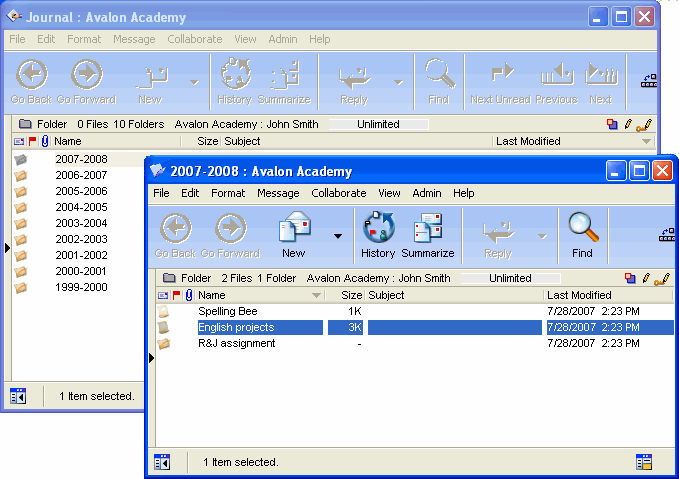
John Smith is an English teacher at Avalon Academy. He maintains a personal journal from year to year to make note of his experiences with each class topic.
He maintains a folder in his Mailbox called Journal. Inside it, he has subfolders for each year, and then documents for each task he writes about.
7282006_30218_6.png

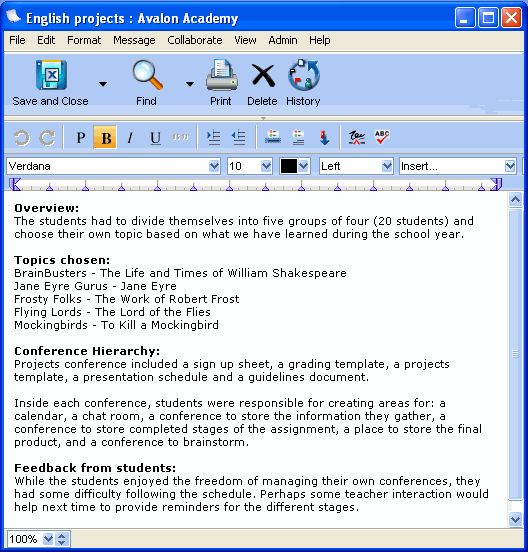
Here are his notes for the last English project he assigned.
8202006_22932_0.png